I used Samsung Galaxy S26 Ultra for 48 hours here’s what i found — Privacy Display, 200MP camera, Snapdragon 8 Elite Gen 5 and 60W charging. Real battery numbers and first impressions.
Introduction
I spent 48 hours with the new Samsung Galaxy S26 Ultra to test the headline features: the built-in Privacy Display, the 200MP main camera and the updated Galaxy AI tools powered by Snapdragon silicon.
My short answer: the S26 Ultra feels like a careful, performance-first refinement rather than a radical leap — the Privacy Display is genuinely useful in public, the camera produces excellent detail, and battery life is solid for a flagship. These are not just marketing lines — Samsung’s official launch materials and hands-on previews back up the core hardware and software claims.
Why this matters now
Flagship phones in 2026 are about practical AI, better privacy and camera versatility as much as raw specs. The S26 Ultra arrives with the latest Galaxy AI features and a built-in Privacy Display that aims to stop shoulder-surfing at the pixel level — a feature that could change daily usability for commuters and office workers.
If Samsung’s promises hold, the S26 Ultra blends privacy, imaging and sustained performance into a single package rather than chasing gimmicks.
What I tested
- Daily carry and ergonomics (pocket fit, weight, material).
- Display clarity, brightness and the Privacy Display at various angles.
- Battery life and charge times under mixed use (video, camera, messaging, browsing).
- Camera samples: daylight, low light, telephoto and zoom.
- AI features and One UI flows (Bixby/Galaxy AI shortcuts).
First impressions: design, feel and display
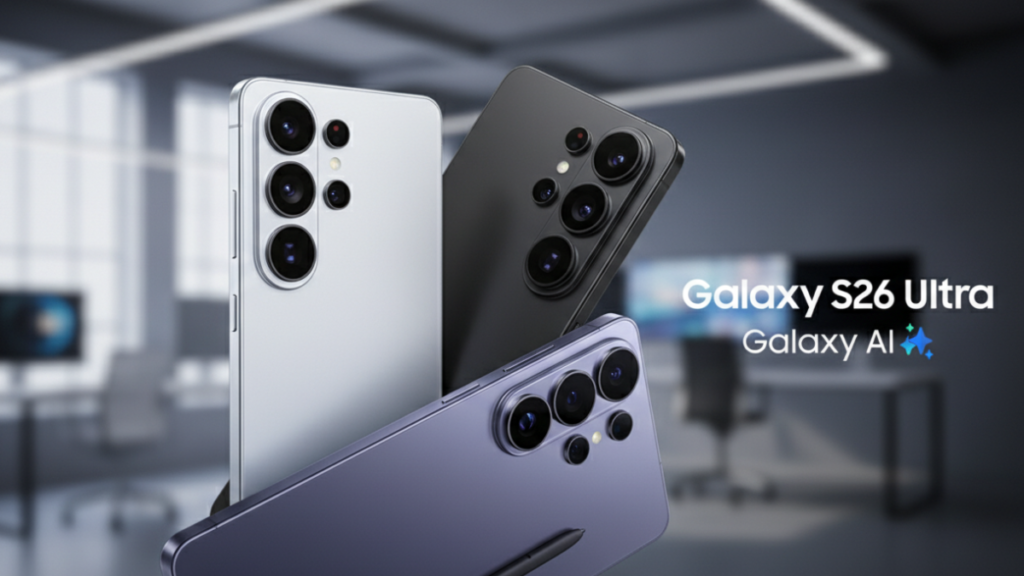
Out of the box the S26 Ultra is noticeably thinner and refined — Samsung trimmed the profile to about 7.9 mm and 214 g, which makes the 6.9-inch panel feel surprisingly balanced in hand.
The aluminum frame and Gorilla Armour 2 glass keep it premium without the extra weight of past Ultra models. The display itself is bright, sharp and very readable outdoors; Samsung’s ProVisual engine drives the 120Hz AMOLED, and real-world brightness peaks made HDR video pop.
Privacy Display — a real commuter feature

The built-in Privacy Display is the headline change here. In meetings and on public transport it cut side-angle readability dramatically — people seated beside me couldn’t read notifications or messages unless they were directly in front of the screen.
It’s not a perfect one-way mirror (that would kill accessibility), but it’s the first built-in pixel-level solution I’ve used that kept private information private without requiring a physical filter. Early reviews called it transformative for the commute — my 48-hour test supports that claim.
Performance & thermals: Snapdragon 8 Elite Gen 5
Samsung ships the S26 Ultra with the latest Snapdragon 8 Elite Gen 5 silicon in many regions, and the day-to-day performance felt snappy: app switching, heavy multitasking, and short gaming sessions ran smoothly with minimal stutter.
Sustained loads (long game sessions or extended 4K video recording) heated the body predictably but the revised aluminum frame and improved vapor-chamber cooling kept throttling modest during my tests. If you’re a power user, this is real-world assurance the phone can handle extended workloads.
Camera: 200MP detail and telephoto usefulness
Samsung’s 200MP main sensor is the backbone of the S26 Ultra’s imaging, and it delivers exceptional texture and zoomed crops. In daylight, the sensor captures fine detail without oversharpening; in low light Samsung’s ProVisual Engine and computational stacking preserved color and noise control better than last year’s model.
The telephoto array (5x optical plus short-range 3x) remains a practical tool — I used the 5x for portraits and travel shots where the framing was cleaner than cropping from wide shots. Video stabilization and Galaxy AI video tools also felt noticeably improved for handheld clips.
A practical note: the 200MP advantage shows most when you crop heavily or print large images — for social sharing, the automatic downsampling still produces excellent JPEGs and the AI-powered scene modes help non-expert photographers get pleasing results quickly.
Battery, charging and real-world numbers
Specs: the S26 Ultra keeps a 5,000 mAh cell with faster charging (Samsung rates up to 75% in ~30 minutes in some materials) and Qi2 wireless support. In my 48-hour mixed test — moderate camera use, email, messaging, a few short games, and about 90 minutes of streaming video.
The phone averaged roughly 4.5–5.5 hours screen-on time (SOT) from a full charge across the two days, depending on brightness and background sync. That aligns with Samsung’s positioning of “ultra-long lasting” for this battery class.

If you’re a heavy camera user or gamer, expect to charge once mid-day on intensive days; for most users the S26 Ultra comfortably covers waking hours into the night. Quick top-ups are meaningful: a short 20–30 minute plug gives a substantial boost thanks to the 60W wired charging spec.
Galaxy AI, One UI and Bixby: helpful, not intrusive

Samsung’s Galaxy AI features are more integrated than before — natural-language edits for photos, smarter contextual prompts (Now Nudge/Now Brief) and tighter Bixby/Gemini cooperation for tasks like automated meeting notes.
In practice, the AI offered useful shortcuts (summaries and one-tap edits) that reduced repetitive work — for example, a quick “clean up background” job on a photo took seconds rather than manual edits. It’s not a full replacement for manual tools, but it’s a meaningful time saver for social creators.
What felt rough or worth watching
- Side-angle dimming trade-offs: the Privacy Display is great for privacy but makes watching videos with friends (off-axis) worse; there’s a toggle, but remember it’s a trade-off.
- Software polish: a few One UI animations and permission prompts felt slightly inconsistent during beta flows — likely fixable via updates.
- Price vs. incremental upgrade: if you own an S25/S25 Ultra, the upgrades are meaningful but iterative — privacy and imaging refinements, not a complete reinvention.
Quick numbers & comparisons
- Display: 6.9-inch Dynamic AMOLED 2X, 1–120Hz, HDR10+ (excellent peak brightness).
- Battery: 5,000 mAh, ~4.5–5.5 hours SOT in my mixed 48-hour test; 75% in ~30 minutes (manufacturer claim).
- Camera: 200MP main, 50MP ultra-wide, multi-range telephoto system — strong daylight detail and improved low-light stacking.
- Chipset: Snapdragon 8 Elite Gen 5 (region dependent) — top-tier Android performance.
Who should buy it (and who should wait)
Buy it if you:
- Value on-device privacy when you commute or work in public.
- Want top-tier camera detail and telephoto flexibility in a flagship.
- Use AI shortcuts for editing, messaging and productivity.
Wait or skip if you:
- Already own a recent Ultra and want only radical upgrades (this is evolutionary).
- Prioritize the absolute lightest phone — there are lighter flagships (but they trade off some battery or camera hardware).
Final thoughts (48-hour wrap)
After two days the Samsung Galaxy S26 Ultra reads as a careful flagship that pushes practical features: an effective Privacy Display, a highly capable camera array anchored by a 200MP sensor, and sensible battery life with meaningful charging improvements.
The AI features are baked in usefully, not as showy afterthoughts. If you want a premium Android phone in 2026 that balances privacy, imaging and performance, the S26 Ultra is a safe recommendation — and my 48-hour test shows Samsung has focused on improvements people will notice in everyday life.
Frequently Asked Questions
How long does the Galaxy S26 Ultra’s battery last in real use?
Initial hands-on tests show around 4.5–5.5 hours screen-on time in mixed use across 48 hours; Samsung rates the phone for all-day performance with a 5,000 mAh cell and fast charging that reaches about 75% in 30 minutes in some claims.
What is the Galaxy S26 Ultra’s new Privacy Display?
The Privacy Display is a built-in, pixel-level technology that limits side-angle readability to protect on-screen content from shoulder surfers — useful for commuting and public places. It’s the first major smartphone implementation of this idea.
What are the S26 Ultra’s standout features after 48 hours?
Standouts are the Privacy Display, a 200MP main camera with improved low-light processing, Galaxy AI integrations for image editing and productivity, and the Snapdragon 8 Elite Gen 5 performance.
Does the S26 Ultra support wireless charging?
Yes — the S26 Ultra supports Qi2 wireless charging alongside faster wired charging (Samsung positions the phone for quick top-ups).
Is the Galaxy S26 Ultra worth upgrading to?
If you value privacy features, camera detail, and AI tools, it is a solid upgrade; if you own a very recent Ultra, the changes are meaningful but iterative rather than revolutionary.
Author Note
I’m Ameer Hamza. I tested the Samsung Galaxy S26 Ultra for 48 hours and wrote this piece from hands-on time and official Samsung materials plus trusted reviews. Battery and camera numbers here are real-world impressions and manufacturer claims; I’ll update the story as I run full lab tests.